
This blog now supports standard.site
If you can read this, it means the experiment to add standard.site support to my blog did work.
I’m not going to explain what standard.site is, or why I think it’s A Good Idea™, but if you want some context, these resources are pretty cool:
- A social filesystem, for a quite deep explanation of what ATProto is, why it’s good, and some technical details about its implementation
- Publishing on the Atmosphere with Standard.site, for a high level explanation of what Standard.site is, and some code examples
- Understanding Standard.Site, a more detailed post with actual implementation details
What I do want to explain is what is my end goal here. Whenever I publish a blog post on my site, I want these things to happen:
- the blog post is published as a
site.standard.documentrecord to the Atmosphere - my website is updated with extra metadata to link the post to the
site.standard.documentrecord - the post frontmatter is updated with a reference to the
site.standard.documentrecord - the website (and RSS feed) is updated
- a link to my site is posted on my Eurosky account on a new
app.bsky.feed.postrecord
Hopefully none of that will require human intervention. I just want to write in Markdown, save the changes, and hit the “publish” button (well, the button is technically “running git push on my laptop”, but you get the idea…).
My research indicates that the best tool to do what I want is sequoia.pub, a CLI tool that not only publishes content to atproto, but also takes care of some of the scaffolding around the setup and maintenance process. So I’ll start by installing it with
npm install -g sequoia-cliand authenticating with
sequoia login(I really hope I can skip this when running the automation in headless mode on GitHub Actions…)
Now I can run
sequoia initto create a configuration for publishing.
Sequoia is pretty comprehensive, and will ask for everything it needs to work (including if you want it to share new posts to Bluesky, nice!).
Once everything is set up, running sequoia publish --dry-run shows it’s finding every post on my blog:
🍊  sequoia publish --dry-run
│
●  Site: https://ale.today
│
●  Content directory: ./src/content/blog
│
◇  Found 79 posts
│
●
│  79 posts to publish:
│
│
│    + This blog now supports standard.site (new post) [bsky: will post]
│
│    + A new post type (new post) [bsky: skipped, older than 1 days]
│
│    + Launching Shortcuts from a web page (new post) [bsky: skipped, older than 1 days]
│
│    + FigJam arrow ends (new post) [bsky: skipped, older than 1 days]
│
│    + Two ways of doing (almost) the same (new post) [bsky: skipped, older than 1 days]
│
│    + Maybe not? (new post) [bsky: skipped, older than 1 days]
│
│    + Shot!, the screenshooting tool that does less (new post) [bsky: skipped, older than 1 days]
…
(I told it to skip sharing posts older than 1 day on Bluesky because I don’t want to spam my followers when I publish this for the first time 😅).
Publishing
Now, running sequoia publish should publish the site.standard.document records to my PDS. I can check that everything worked by inspecting the data directly on atproto.at (and you can, too, since everything is public on the atmosphere…).
In addition to publishing the records, sequoia also did something interesting: it added a new atUri attribute to the frontmatter of all the posts on my site. This is awesome, because it saves me a ton of manual work and I can focus on the next step: use that info on the HTML for each post.
On the template for my posts, I can use some of Astro’s magic sauce to do
const { title, description, image = "/og.png", atUri } = Astro.props;

{atUri && <link rel="site.standard.document" href={atUri} />
and we’re off the races.
Validation
With all these changes made and published, I can go to https://site-validator.fly.dev and enter the URL for any of my posts, to see if everything worked as expected:
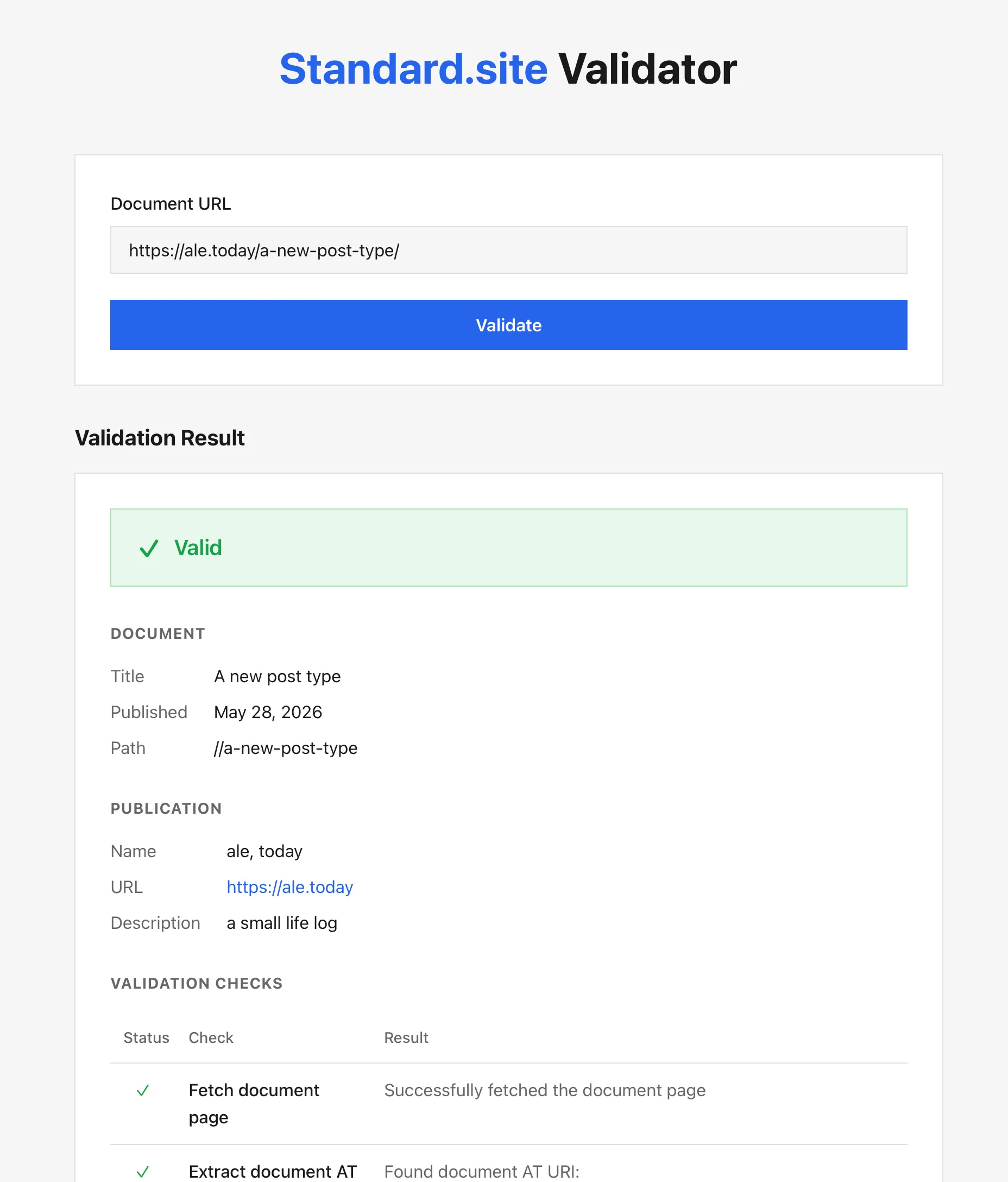
I’d say that’s a yes.
Posting New Content to Bluesky
Now, for the final test: I’ll publish a new post (this one that I’m writing), and run sequoia publish to see if it posts on Bluesky (or Eurosky, in my case).
If that works, I can declare this experiment a success, and move on to automating everything so that it happens on my CI. I won’t bore you with the details, since everything is very well documented on Sequoia’s documentation about workflows.
Update: turns out publishing with sequoia (at least the way my blog is set up) introduces a sort of race condition, in which it shares a link to a post before the website is deployed. I need to think a bit about this, will keep you posted…
Further Tweaking
Sequoia has a couple of extra features I’m definitely going to play with:
Thanks for Reading
If you made it this far, thank you very much for reading. If you didn’t, thank you very much anyway for at least trying.
Have an awesome day!